Tailscale Review: Secure Mesh Network for Remote Access and Device Connectivity
Tailscale is a modern networking solution designed to securely connect devices, applications, and teams across global locations. Unlike conventional VPNs, it operates as a zero-trust mesh network, enabling direct device-to-device communication through encrypted WireGuard tunnels. This architecture eliminates reliance on centralized servers, offering faster speeds and enhanced privacy for users prioritizing secure remote access.
Unlike traditional VPNs that route traffic through intermediary servers, Tailscale establishes peer-to-peer connections between devices. This approach ensures minimal latency and robust security, as data travels directly between endpoints without third-party oversight. The service also integrates with single sign-on (SSO) providers like Google, Microsoft, and GitHub, streamlining authentication for businesses and individuals.
Tailscale Key Features
| Feature | Details |
|---|---|
| VPN Type | Zero-trust mesh network powered by WireGuard |
| Encryption | ChaCha20 for encryption, Poly1305 for authentication |
| Traffic Routing | Direct peer-to-peer tunnels |
| SSO Integration | Supports Google, GitHub, Microsoft, Okta, and more |
| Remote Access | Securely access company resources, devices, and apps |
| NAT Traversal | Automatic configuration |
| Device Support | Windows, Linux, Android, macOS, Raspberry Pi |
| Logging | Minimal metadata logs (device type, IPs, hostnames) |
| Kill Switch | Not built-in (relies on OS settings) |
| Headquarters | Toronto, Canada |
Tailscale Pros and Cons
Before committing, weigh these advantages and drawbacks:
Pros- Free tier supports up to 100 devices (3 users)
- WireGuard protocol ensures fast, secure connections
- Zero-trust mesh network with end-to-end encryption
- SSO integration simplifies authentication
- Cross-platform compatibility (Windows, Android, macOS, Linux)
- Free plan limited to 3 users
- No obfuscation for bypassing geo-restrictions
- Advanced features reserved for paid tiers
- Starter plan offers fewer controls than the free tier
- Metadata logs may concern privacy advocates
What Does Tailscale Offer?
Tailscale includes Taildrop, an early alpha file-sharing tool for transferring files between personal devices. While macOS users must enable it manually via the extensions menu, the feature leverages WireGuard for secure, low-latency transfers. Additionally, Tailscale can function as a traditional VPN by configuring an exit node—a device that routes traffic through its IP address. This setup works best with Linux exit nodes, though performance depends on the host device’s speed and location.
Security: Is Tailscale Secure?
Tailscale’s zero-trust architecture ensures no device or user is trusted by default, even within private networks. Every connection requires explicit authentication, reducing risks of lateral movement if a device is compromised. End-to-end encryption secures data in transit, while WireGuard’s modern cryptography provides low-latency, high-efficiency tunneling. However, the service logs metadata like device types and IPs, which may raise concerns for privacy-focused users.
Privacy: Does Tailscale Protect Privacy?
While Tailscale enables private networking, it isn’t ideal for users seeking maximum anonymity. The service requires interaction with its coordination server, and its Canadian headquarters places it under the Five Eyes Alliance—a group of intelligence-sharing nations. For stronger privacy, consider alternatives like NordVPN. Review Tailscale’s privacy policy for details on data collection practices.
Streaming: Not Designed for Streaming

Tailscale isn’t optimized for streaming. While you can route traffic through an exit node to access region-restricted content, this requires technical setup and relies on Linux devices. Unlike commercial VPNs, Tailscale doesn’t maintain servers for streaming or rotate IP addresses to avoid detection. For seamless streaming, explore dedicated services like our top streaming VPNs.
Speed: Is Tailscale Fast Enough?
Tailscale excels at device-to-device transfers, thanks to direct P2P connections and WireGuard’s efficiency. Regular internet speeds remain unaffected, as only specific traffic flows through the mesh network. However, for bandwidth-heavy tasks like streaming or torrenting, traditional VPNs with optimized servers may deliver better results. Explore our fastest VPN recommendations for speed-focused use cases.
Server Network: No Traditional Servers
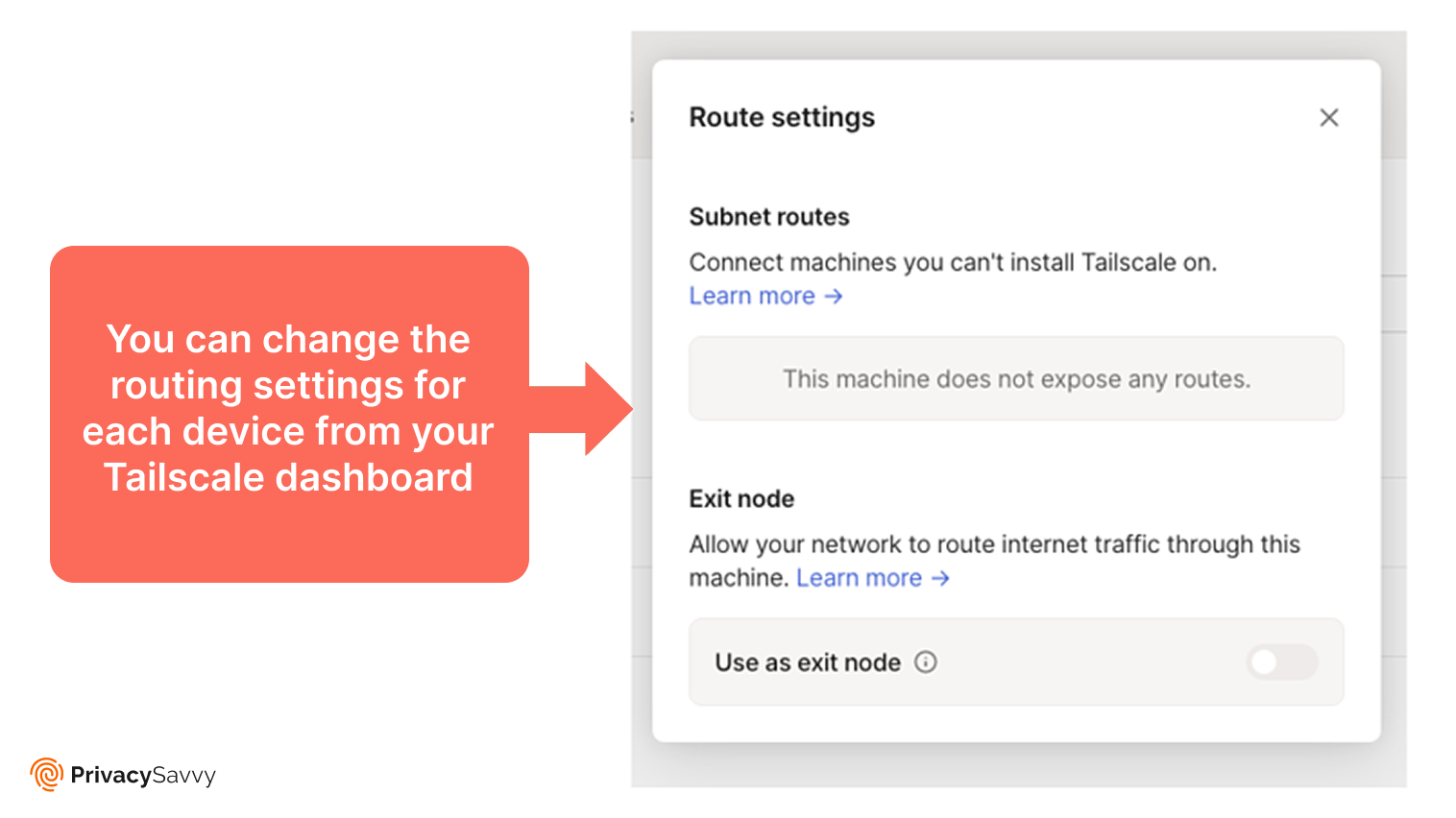
Tailscale doesn’t operate a global server network. Instead, it lets users create private networks by linking devices. The dashboard’s Route settings allow configuration of subnets (for non-Tailscale devices) or exit nodes (for internet routing). While this approach lacks the scalability of traditional VPNs, it’s ideal for secure internal networking and file sharing.
Torrenting: P2P with Limitations
Tailscale supports peer-to-peer connections but isn’t designed for public torrenting. Its focus is on secure file sharing between trusted devices. For anonymous torrenting, opt for a VPN with dedicated P2P servers and a strict no-logs policy, such as our top torrenting VPNs.
Device Compatibility and Integrations
Tailscale supports over 100 integrations, including SSO providers like Google, Okta, and Microsoft Azure AD. Its apps for Windows, Android, macOS, and Linux ensure seamless connectivity across devices. Enterprise users can integrate with pfSense, Cisco, and Fortinet for advanced network management. Alerts via Slack, Google Chat, or Discord enhance collaboration.
Simultaneous Device Connections
Connection limits depend on your plan:
- Free plan: 3 users, 100 devices
- Starter plan: Unlimited users (additional $6/month per user)
- Premium plan: 20x devices per user, priority support
- Enterprise plan: Unlimited devices and admin users
Note that the free tier restricts users to three, while higher tiers offer scalable options.
Installation and Apps
Setting up Tailscale is straightforward. Install the app on each device, log in with an SSO account, and connect to your network. The dashboard simplifies device management, file sharing, and configuration of exit nodes or subnets. For example, macOS users can enable Taildrop via the extensions menu to share files securely.
Pricing
Tailscale’s free plan supports 3 users and 100 devices. Paid plans include:
- Starter: $6/month per additional user (unlimited devices)
- Premium: $18/user/month (20x devices, advanced features)
- Enterprise: Custom pricing with unlimited resources
The free tier includes basic features, while paid plans unlock advanced controls and support.
Reliability and Support
Tailscale’s support team responds promptly, though assistance often directs users to the blog. Enterprise plans include priority support for faster resolution. The official website offers guides for setup, gaming servers, and Minecraft hosting, ensuring users can troubleshoot independently.
Does Tailscale Work in China?
Tailscale may struggle in China due to its WireGuard protocol, which lacks obfuscation. Additionally, its reliance on a central coordination server could be blocked, disrupting network formation. For users in restricted regions, consider VPNs with obfuscation features.
How Tailscale Protects You
Tailscale safeguards connections through:
- WireGuard Noise Protocol: Minimizes downgrade attack risks.
- Daily SSH Key Rotation: Enhances secure shell access.
- Decentralized Tunneling: Reduces latency and ensures privacy.
- Traffic Integrity Checks: Detects man-in-the-middle attacks.
These measures make Tailscale a reliable choice for secure remote access.
How to Create an Exit Node in Tailscale
To set up an exit node:
- Enable IP forwarding: Linux users configure sysctl; macOS/Windows users follow Tailscale prompts.
- Advertise the node: Run
tailscale up --advertise-exit-node. - Approve the node: Log in to the admin console and enable exit node access.
- Use the node: Select it in the Tailscale client on other devices.
This routes traffic through the exit node’s IP, mimicking a traditional VPN gateway.
Tailscale VPN Alternatives
| Feature | NordVPN | Surfshark | Proton VPN |
|---|---|---|---|
| Encryption | AES-256, NordLynx (WireGuard) | AES-256, WireGuard | AES-256, WireGuard |
| Servers | 8,000+ in 120+ countries | 3,200+ in 100 countries | 12,000+ in 120+ countries |
| Business Features | Dedicated IPs, business plans | Multi-user support | Proton for Business |
| Cheapest Plan | $3.29/month (2-year) | $2.29/month (2-year) | Free plan, $4.99/month |
FAQs
Is Tailscale a VPN? Tailscale isn’t a traditional VPN. It creates a private mesh network for device connectivity rather than routing traffic through remote servers.
How does Tailscale work? It uses WireGuard to establish encrypted tunnels between devices, enabling secure file sharing and remote access without centralized servers.
Is Tailscale secure? Yes, its zero-trust model and WireGuard encryption ensure secure connections. However, metadata logging and Canadian jurisdiction may concern privacy advocates.
Is Tailscale good for streaming? No. While exit nodes can bypass geo-blocks, Tailscale lacks optimized servers for streaming. Dedicated VPNs like NordVPN are better suited.
What devices does Tailscale support? It works on Windows, Linux, Android, macOS, and Raspberry Pi, with integrations for enterprise firewalls and SSO providers.
